

What hreflang tags are?
If your Shopify store serves customers in multiple countries or languages, search engines need to know which version of a page should appear for each visitor.
This is where hreflang tags come in.
A hreflang tag is an HTML attribute that tells search engines the language and, optionally, the regional targeting of a specific page.
For example, if your store has separate English and French versions of the same product page, hreflang tags help search engines understand that both pages are valid alternatives rather than duplicate content.
When someone searches on Google, hreflang tags increase the chances that they will be directed to the version of your store that best matches their language and location.
This creates a better user experience and helps search engines display the most relevant content to your audience.
For example:
- A customer in the United States may be shown the English (United States) version of a product page.
- A customer in France may be shown the French version of the same page.
- A customer in Germany may be shown the German version, if one exists.
Without hreflang tags, search engines may struggle to determine which version of a page should be shown to users in different regions, potentially reducing your international SEO performance.
The good news is that Shopify automatically generates hreflang tags for eligible stores that use Shopify Markets and multiple languages.
In the following sections, you'll learn how this works, how to manage it, and how to verify that the correct hreflang tags are being generated.
Why hreflang tags matter for SEO and international stores
If your Shopify store targets customers in multiple countries or supports multiple languages, hreflang tags play an important role in helping search engines deliver the right content to the right audience.
Without hreflang tags, search engines may have difficulty determining which version of a page is intended for a specific language or region. As a result, users could land on a version of your store that isn't relevant to them, leading to a poor shopping experience.
To maximize the impact of your international SEO efforts, also consider optimizing your meta descriptions for each market and enhancing your social presence with proper social sharing images.
Here are some of the main benefits of using hreflang tags:
Show the correct page to the right audience.
Search engines can display the version of your store that matches a user's language or geographic region, improving the overall user experience.
Reduce duplicate content concerns.
Product pages translated into different languages or customized for different markets often contain similar content. Hreflang tags tell search engines that these pages are intentional alternatives, not duplicates competing against each other.
Improve international SEO.
By helping search engines understand the relationship between localized pages, hreflang tags can improve the visibility of your store in international search results.
Increase conversions.
Customers are more likely to purchase when they browse your store in their preferred language and see region-specific information, such as local currencies, shipping options, and pricing.
Support Shopify Markets.
Shopify automatically generates hreflang tags for stores using Shopify Markets with multiple languages or regional domains, making it easier to maintain proper international SEO without manually editing your theme.
In short, hreflang tags help search engines understand which version of a page should be shown to which users.
For merchants selling internationally, this improves both search visibility and the shopping experience, making hreflang tags an essential part of a successful global Shopify store.
How Shopify automatically generates hreflang tags
One of the advantages of using Shopify Markets is that Shopify automatically generates hreflang tags for your storefront.
Instead of manually adding and maintaining these tags in your theme, Shopify creates and updates them based on your store's international configuration.
The generated hreflang tags help search engines understand which version of a page should be shown to customers based on their language and region.
Requirements for automatic hreflang tags
For Shopify to generate hreflang tags, your store needs:
- Shopify Markets configured.
- Multiple published languages or regional market versions of your storefront.
- A domain, subdomain, or URL subfolder assigned to each market.
Once these requirements are met, Shopify automatically inserts the appropriate hreflang tags into the <head> section of your storefront pages.
| URL | Language | Market |
|---|---|---|
| yourstore.com | English | United States |
| yourstore.com/fr/ | French | France |
| yourstore.com/de/ | German | Germany |
When a search engine crawls any of these pages, it also discovers the alternative language versions through the generated hreflang tags.
This tells search engines that these pages are localized versions of the same content rather than duplicate pages, allowing them to display the most appropriate version to users.
Each hreflang tag contains:
A language code, such as en, fr, or de.
Optionally, a country or region code, such as US or FR, when the content targets a specific market.
For example:
en-US → identifies the English version for customers in the United States.
fr-FR → identifies the French version for customers in France.
de-DE → identifies the German version for all German-speaking regions.
In addition to these tags, Shopify also generates an x-default hreflang tag that points to your store's primary domain. This serves as the default version of your storefront when none of the available language or regional versions is a suitable match for the visitor.
The biggest advantage of Shopify's automatic implementation is that you don't have to manage these tags manually.
Whenever you publish a new language, add a new market, or change your domain structure, Shopify automatically updates the hreflang tags across your storefront, helping ensure that search engines always have accurate information about your localized pages.
Requirements for automatic hreflang generation
Shopify generates hreflang tags only for markets that use a distinct domain, subdomain, or URL subfolder.
This is because each language or regional version of your storefront must have its own unique URL.
If all your markets share the same URL with no language or regional distinction, Shopify has no alternate pages to reference, so hreflang tags aren't generated for those markets.
How to disable automatic hreflang tags
Although Shopify's automatic hreflang tags work well for most stores, there are situations where you may prefer to manage them yourself.
For example, you might want to generate custom hreflang tags directly in your theme or use a third-party SEO app that provides more advanced control.
In these cases, it's recommended to disable Shopify's automatic hreflang tags. Having multiple sets of hreflang tags on the same page can send conflicting signals to search engines and make it more difficult for them to determine the correct language or regional version of your content.
In short, each page should have only one consistent set of hreflang tags. If you're replacing Shopify's automatic implementation with your own, be sure to disable the automatic tags first to avoid duplicate or conflicting hreflang annotations.
Before disabling Shopify's automatic hreflang tags, ensure that your store already has an alternative hreflang implementation. Turning off this feature without replacing the tags can negatively affect your store's international SEO. Disable it only if your custom theme or third-party app is generating a complete and valid set of hreflang tags.
With that said, let's proceed.
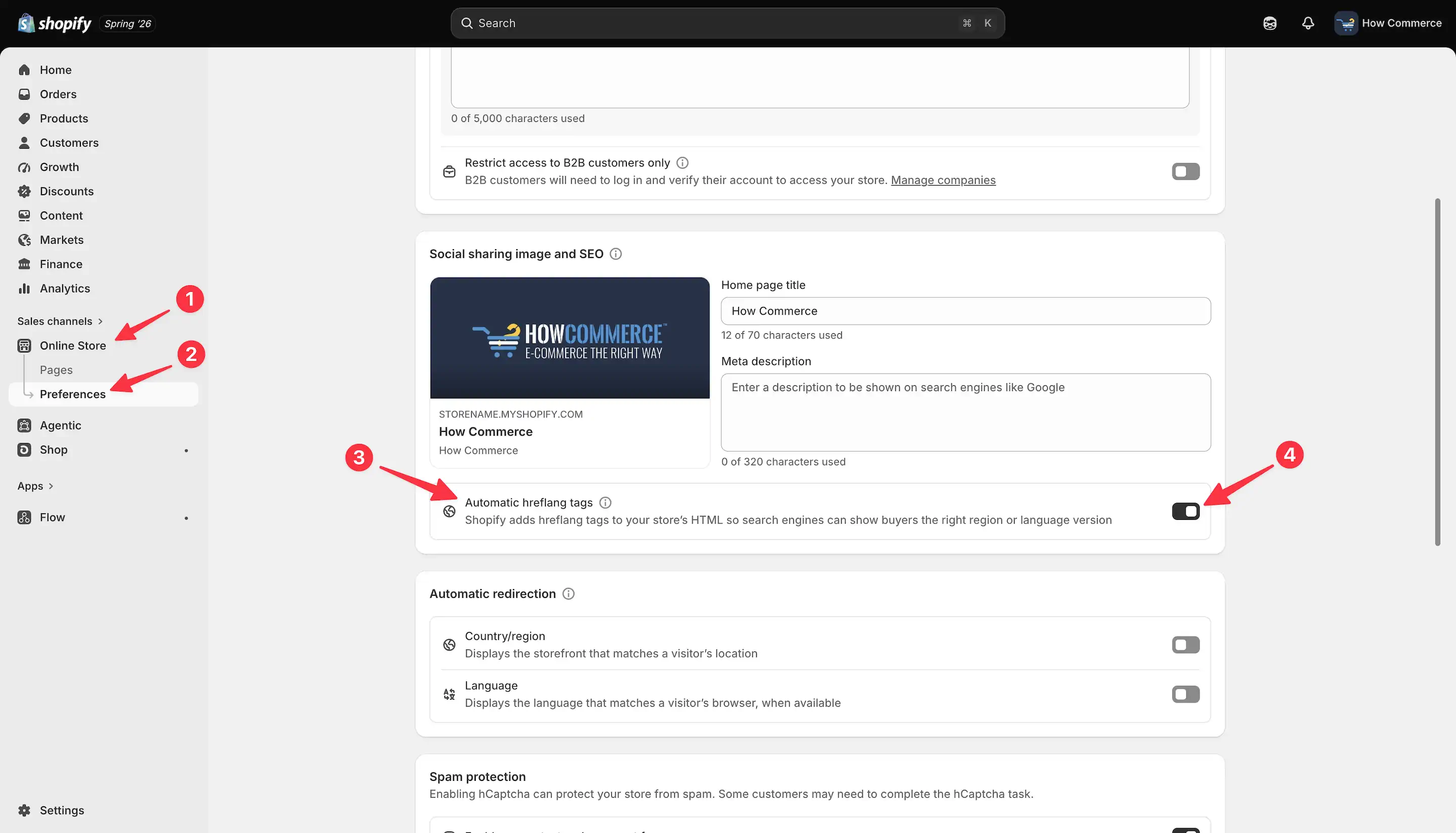
Go to the Online Store (marked with 1 in the image below), then click Preferences (marked with 2 in the image below).
Go to the Social Sharing Image and SEO section and look for the Automatic hreflang tags setting (marked with 3 in the image below).
It is currently enabled (marked with 4 in the image below). Click the toggle to disable it.
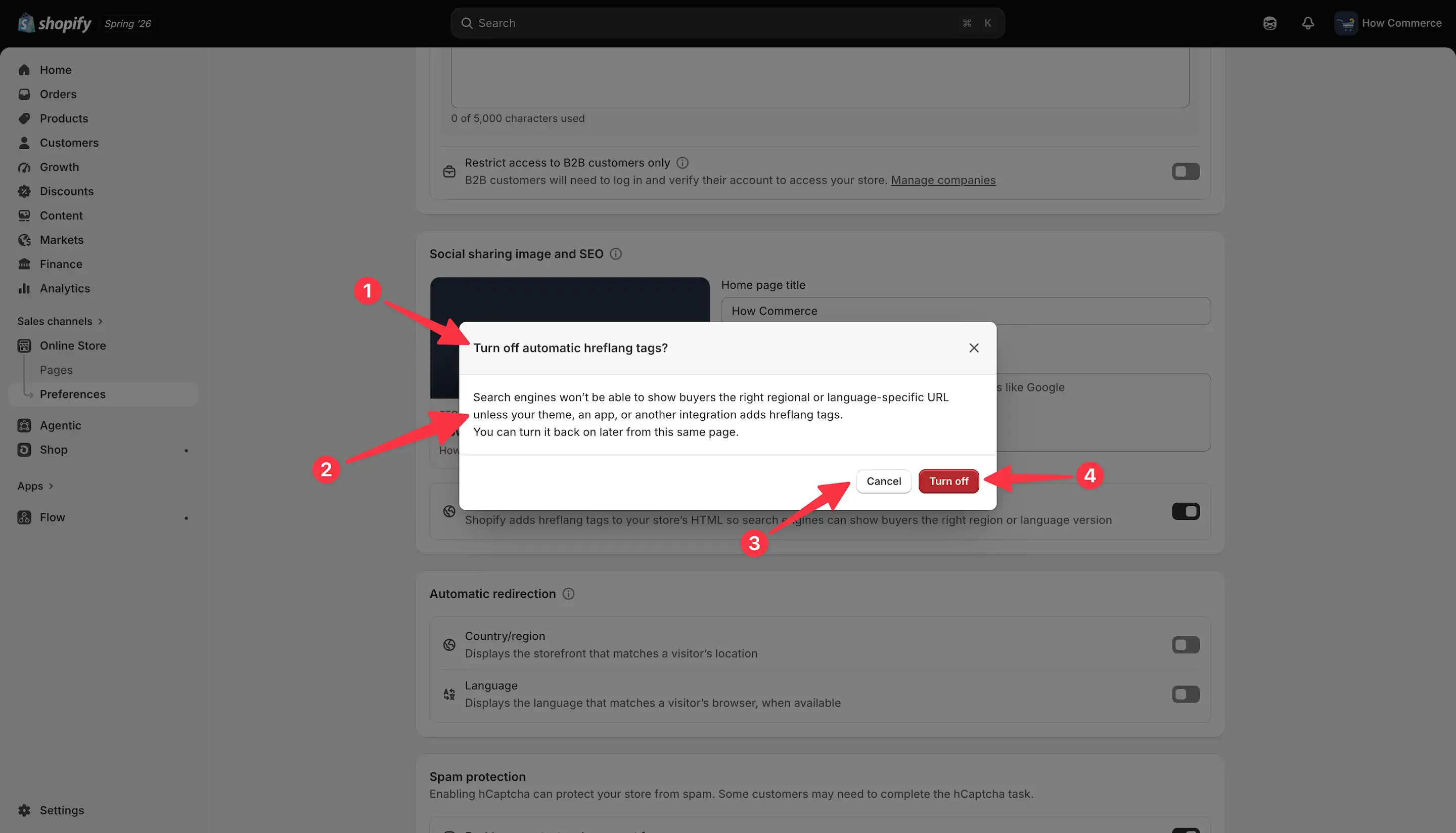
A modal will appear asking you to confirm the action (marked with 1 in the image below).
A warning is also displayed (marked with 2 in the image below), explaining the potential drawbacks of switching this option off.
If you change your mind, you can cancel the operation by clicking the Cancel button (marked with 3 in the image below).
If you want to continue and turn this option off, click the Turn off button (marked with 4 in the image below).
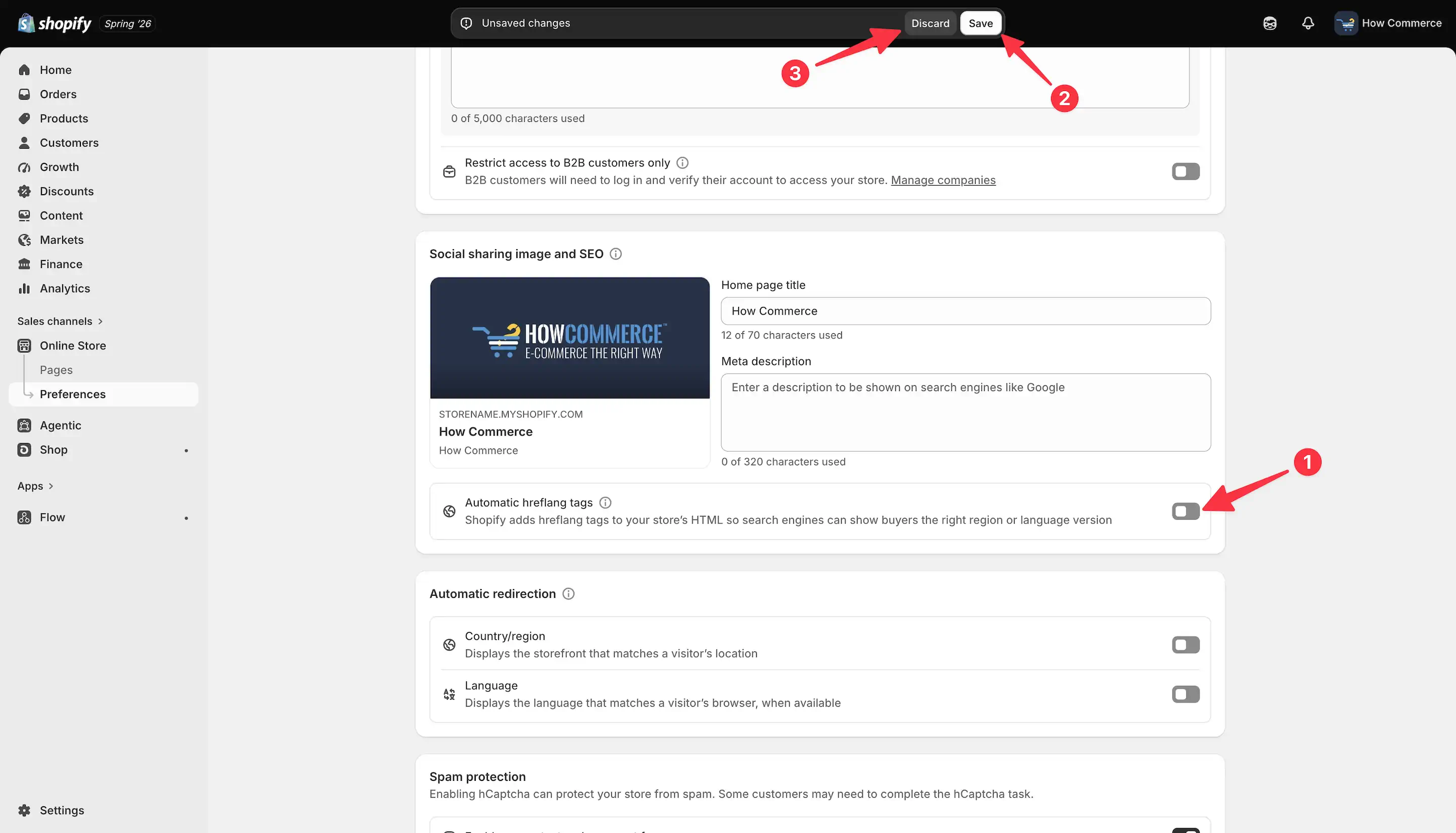
The Automatic hreflang tags setting is now turned off in the interface but has not yet been saved (marked with 1 in the image below).
Until you save the new settings, no changes will be applied.
To save your settings, click the Save button (marked with 2 in the image below). If you change your mind, click the Discard button instead (marked with 3 in the image below).
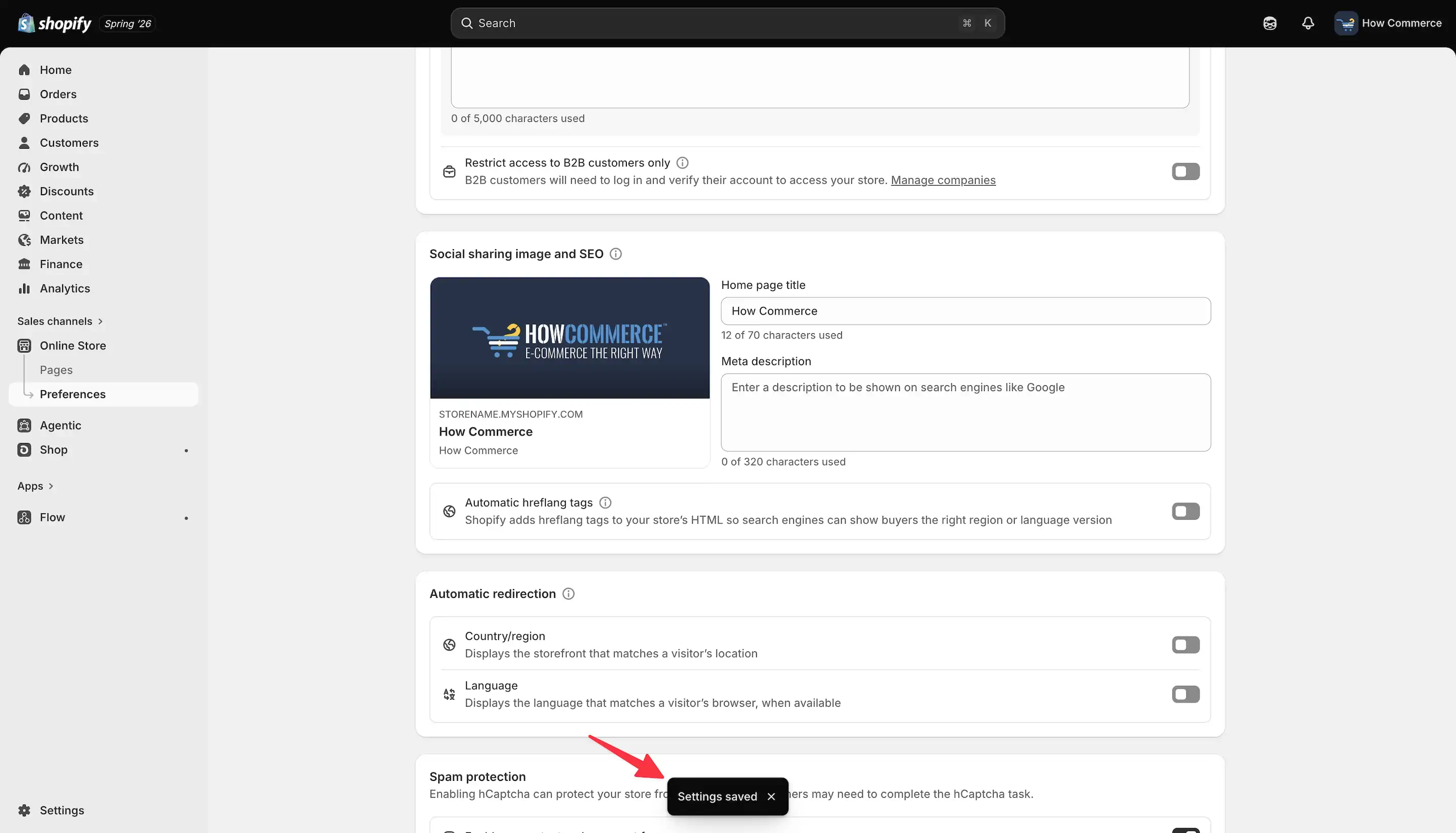
The settings are saved only when you see the Settings saved message, as shown in the image below.
How to verify the tags
This should be verified using your browser's developer tools, such as Chrome DevTools, Safari Web Inspector, or similar tools.
This verification should only be performed by an experienced developer, as it involves technical SEO and can have a significant impact on your store.
You should see something like this:
 <link rel="alternate" hreflang="en-US" href="https://yourstore.com/products/t-shirt">
 <link rel="alternate" hreflang="fr-FR" href="https://yourstore.com/fr/products/t-shirt">
 <link rel="alternate" hreflang="de-DE" href="https://yourstore.com/de/products/t-shirt">
 <link rel="alternate" hreflang="x-default" href="https://yourstore.com/products/t-shirt">
Understanding the x-default hreflang tag
Along with language and regional hreflang tags, Shopify also generates an x-default tag.
Unlike other hreflang values, x-default isn't associated with a specific language or country. Instead, it tells search engines which page should be used as the default when none of the available language or regional versions matches the visitor.
For most stores, this points to the primary storefront, making it a fallback version for international visitors.
Although customers may never notice the x-default tag, it helps search engines understand your international storefront structure and improves the way localized pages are served in search results.
Common issues and troubleshooting
The hreflang tags did not change
Changes are not applied until you click the Save button and see the Settings saved confirmation message.
The old hreflang tags are still visible
If you are checking immediately after making the changes, your browser or a CDN may still be serving a cached version of the page. Clear your browser cache, purge your CDN cache if applicable, and refresh the page before verifying the tags again.
The hreflang tags are missing
If the expected hreflang tags are not present, verify that your theme or installed apps are generating them correctly. If you have disabled Shopify's automatic hreflang tags, ensure that your custom implementation outputs valid hreflang tags for every supported market and language.
Duplicate hreflang tags
If both Shopify and a third-party app generate hreflang tags, duplicate tags may appear in the page source. Duplicate implementations can confuse search engines and should be avoided.
Incorrect hreflang URLs
Verify that every hreflang tag points to the correct localized URL and that all alternate versions reference one another consistently.
Incorrect language or country codes
Use valid ISO language and country codes when generating hreflang tags. Invalid values may be ignored by search engines.
Search engines are not reflecting the changes
Search engines may take time to recrawl and process updated hreflang tags. Even after the changes are live, it may take several days or weeks before they are reflected in search results.
Do not confuse canonical and hreflang
Although they often appear together in the page source, hreflang and canonical tags serve different purposes.
A canonical tag tells search engines which URL is the preferred version of a page when similar or duplicate pages exist.
A hreflang tag, on the other hand, tells search engines which language or regional version of a page should be shown to users.
For example, the English and French versions of a product page should each have their own canonical tag pointing to themselves, while the hreflang tags reference all available language versions.
In other words:
Canonical tags identify the preferred version of a page.
The hreflang tags identify the appropriate version of a page for different languages and regions.
These tags work together and should not be considered replacements for one another.
Best practices
If you are working on a high-revenue store, do not attempt changes like this unless you have years of relevant experience.
If implemented incorrectly, these changes can significantly damage your customer's organic visibility, resulting in substantial traffic and revenue losses.
In my opinion, advanced technical SEO settings like these should ideally be managed by experienced developers or technical SEO professionals, as incorrect changes can have a significant impact on a store's organic traffic.
Unless you fully understand the implications of these settings, leave them unchanged and consult an experienced Shopify developer or technical SEO specialist before making any modifications.
Final thoughts
Disabling Shopify's automatic hreflang tags is a significant technical SEO change that should only be done when you have a valid reason and an alternative implementation in place.
If you decide to make this change, always verify that your custom hreflang tags are generated correctly for every supported market and language. Even small configuration mistakes can affect how search engines understand and index your international storefront.
For most stores, Shopify's automatic hreflang tags provide a reliable solution. Only replace them if your requirements go beyond what Shopify offers and you are confident that your custom implementation is accurate, thoroughly tested, and easier to maintain in the long term.
When in doubt, consult an experienced Shopify developer or technical SEO specialist before deploying changes to a live store.